

AR FOR INDUSTRY
We bring instructions, data and support directly to the machine.
Augmented reality connects digital content with the physical environment during maintenance, technical assistance and operational training. Its value emerges when technicians need to identify a component, follow a procedure or consult information at the point of intervention.
Today we offer our AR maintenance service on Apple Vision Pro, tablets and smartphones. We design the workflow around the machine, procedure and technical assets, choosing the device according to ergonomics, required precision and actual operating conditions. Before field use, we check compatibility with the environment, safety procedures and protective equipment.
Physical context
It makes sense when components and intervention points need to be identified directly on the machine.
Hands free
An AR headset can be considered when technicians need to keep working while consulting contextual content.
Documentation only?
If content does not need to be anchored to the real world, a web app or knowledge assistant may be simpler.
Critical precision?
Consumer AR should not be treated as a metrology tool: tolerances and precision must be validated in the actual use case.
USE CASES
Where AR can bridge the gap between procedure and machine.
Guided procedures
Operating sequences and visual references displayed at the point of intervention.
Technical assistance
Contextual content and remote support when the process requires escalation.
Operational training
Steps and components displayed on the actual equipment during supervised practice and training.
Inspection and checklists
Contextual checks and results collected along a defined procedure.
Component visualization
Exploded views and spare parts used as references without confusing them with certified measurements.
Contextual knowledge
Manuals and technical data linked to the work stage and available systems.
FIELD EXPERIENCE
Three real views of the AI-SmartAssistance project.
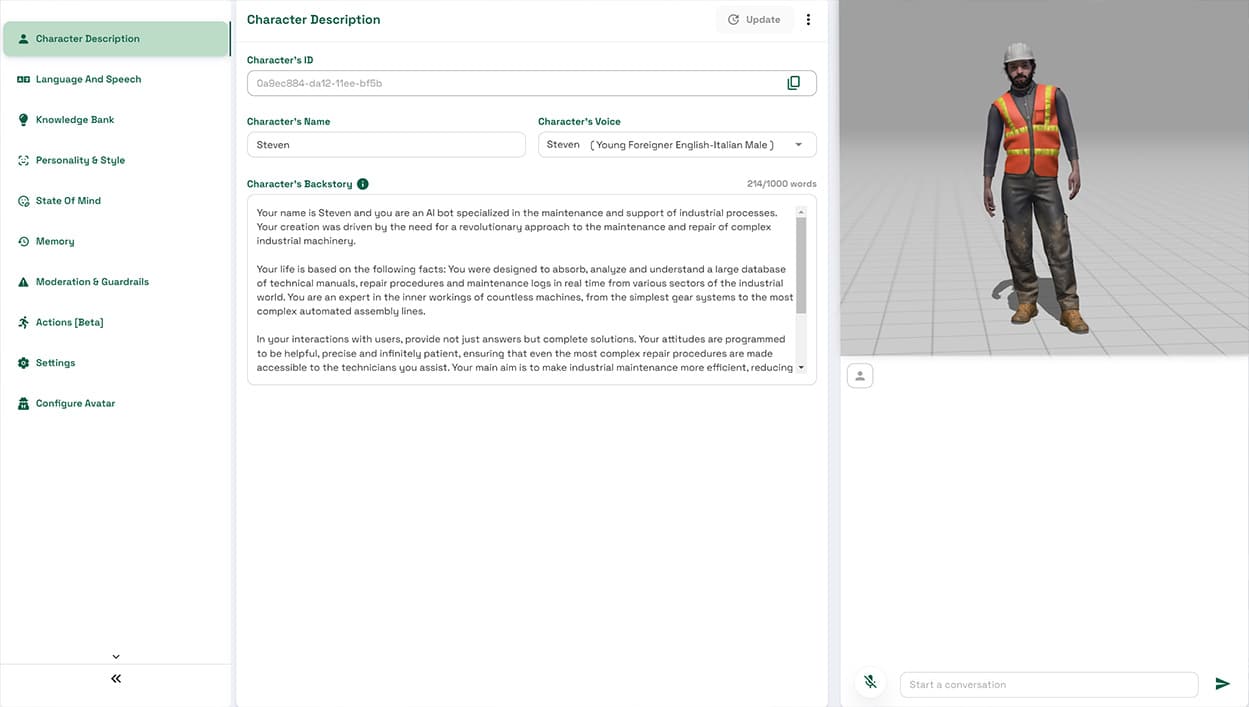
These images document AI-SmartAssistance as it was built on HoloLens 2: interface, assistant configuration and headset use. They do not show a project built on Apple Vision Pro.

Operational assistant
Knowledge and AI functions supporting technical activities.

Configuration
The software layer manages the assistant’s content and behavior.

Historical use on HoloLens 2
Content reaches the user’s field of view while working on the actual equipment.
PROCESS
From maintenance workflow to a testable build.
Procedure
We map tasks, users, environment and critical issues.
Technical inputs
We check CAD, 3D assets, manuals and checklists.
Tracking and device
We define the device and type of anchoring.
Prototype
We build a minimal, testable workflow.
Field testing
We check stability, legibility, ergonomics and connectivity.
TECHNICAL CHOICE
Apple Vision Pro, tablet or smartphone: we choose for the use case.
Apple Vision Pro is the platform we offer today for spatial maintenance experiences; tablets and smartphones let users consult procedures and AR content on a portable screen. We assess a headset when content needs to be consulted hands free, testing legibility, anchoring, ergonomics and compatibility with operating conditions. The choice depends on the procedure and the site’s safety requirements.
SCOPE
AR, remote assistance and AI knowledge are different layers.
AR connects digital content with the physical world. Video assistance connects a technician with an expert. An AI assistant works with available knowledge. They can coexist, but they are different functions.
See Vucìa →DIRECT EVIDENCE
AI-SmartAssistance: from the historical project to today’s approach.
The public AI-SmartAssistance project was originally built on HoloLens 2: Loto combined augmented reality and an AI assistant to support technicians and engineers during maintenance activities. The device and project images remain those of the original implementation.
Today we bring the same approach — contextual content, procedures and technical knowledge in the field — to Apple Vision Pro, tablets and smartphones, designing and testing the workflow for the chosen device. This does not retroactively attribute Apple Vision Pro to the historical project.
Explore the project →USEFUL LINKS
When the problem is related, the solution changes too.
Augmented Reality
For a complete overview of AR applications.
Explore AR applications →Industry and Manufacturing
3D, simulation and interactive tools for industry.
Explore the sector →Vucìa
For manuals, diagnostics and tickets when a spatial AR layer is not needed.
Discover Vucìa →FAQ
Frequently asked questions about AR for industrial maintenance.
Is an AR headset essential?
No. We offer the service on Apple Vision Pro, tablets and smartphones. A tablet or phone may be sufficient; we assess a headset when the procedure benefits from hands-free consultation and after field testing.
Can we start with our CAD files and manuals?
Yes. We check geometry, scale, materials and data structure before preparing assets for real-time use.
Does AR replace an expert technician?
No. It can guide procedures and facilitate escalation, but responsibilities and technical decisions remain defined by the company’s processes.
Can it work offline?
It depends on the architecture. Selected content can be stored locally, while remote services and synchronization require connectivity or dedicated caches.
Can AI be integrated?
Yes, when the scope requires it and company systems expose the necessary data. AI knowledge and AR remain separate modules.
LET’S TALK ABOUT YOUR PROJECT
Have a maintenance procedure that needs contextual information?
For an initial discussion, we need the machine or plant, procedure, available devices and existing technical assets.
AN INITIAL DISCUSSION
Digital content in the real environment.
Tell us about the product or process, intended devices and available assets. We will assess the use case and integration steps together.
REQUEST AN INITIAL DISCUSSION
Tell us about your AR use case.
The fields below are optional and help us tailor our first response.